

OpenCV is a library of programming functions mainly aimed at real-time computer vision. I think personally that this library is a powerful item on account of the range of usability. We can use in programming drones, verification application, robotics, comparison images… In this post I will code a simple face detection app in OpenCV. My IDE is PyCharm.
First of all, you have to install OpenCV on your machine. In case of Windows system you can type:
pip install opencv-python
After installation I recommend restart your computer. In the next step you create a basic project in selected IDE.
The first command in new project is:
import cv2
It is obvious that in face detection project you have to have an access to webcam. In this situation helps us the command:
video_capture = cv2.VideoCapture(0);
The important thing is the digit – if you use webcam built in your device (laptop, desktop) you should type 0 . In case of external webcam, just type -1 or 1.
In the next line you have to create an infinite loop to be able to read an image (live video). Simultaneously you should add a line according to displaying the live video (window).
While True:
_, image = video_capture.read()
cv2.imshow(“Rozpoznawanie twarzy”)
After launching the program, you should have a possibility to quick from the program. So in the next line type:
if cv2.waitKey(1) & 0xFF == ord(‘q’):
break
It means that when you hit ‘q’, the program will stop execute.

Now, you have to download at least two files – these are responsible for different parts of face.
Download haarcascade_eye.xml and haarcascade_frontalface_default.xml
Extract files and move to project folder.
When you have basic code, downloaded files, you can start code a boundary when the program detect a face.
Add:
def draw_boundary(img):
gray_img = cv2.cvtColor(img, cv2.COLOR_BGR2GRAY)
features = classifier.detectMultiScale(gray_img, scaleFactor,minNeighbors)
coords = []
for (x,y,w,h) in features:
cv2.rectangle(img,(x,y), (x+w, y+h),color,2)
cv2.putText(img, text, (x, y-4), cv2.FONT_HERSHEY_SIMPLEX, 0.8, color,1, cv2.LINE_AA)
coords = [x,y,w,h]
return coords
This function finds parts of face in grayscale image. Then it draws appropriate rectangle to point on face 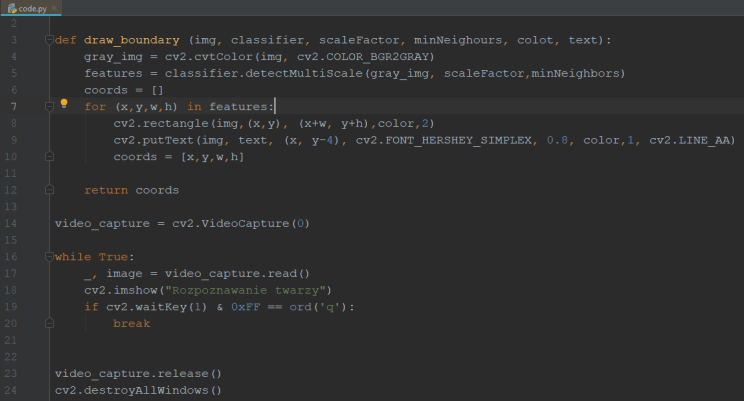
 Learn with Wojtek