Constructor in OOP – what is it ?

A constructor
Firstly, I would like to focus on a constructor. So what is it ? Constructor is a special non-static member function of a class that is used to initialize objects of its class type. Frankly… during creating an object there is a default constructor which you can’t see in IDE but you have a possiblity to modify.  You can meet constructor e.g during click right button on your mouse. You see a menu created by a constructor.

Let’s write a code using a constructor in your project. On the start create a class:
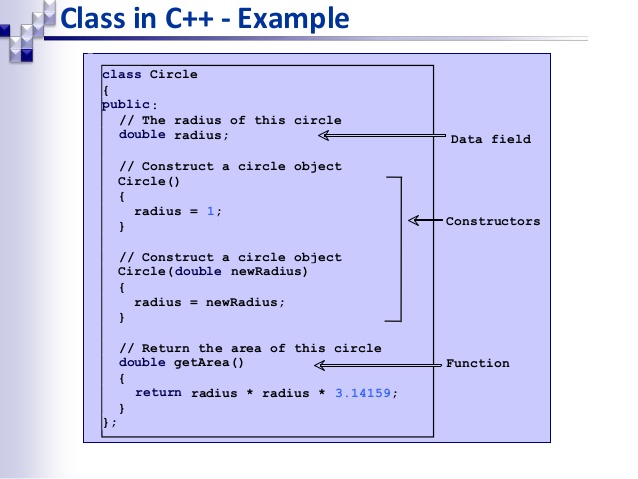
oop-objectsclasses-10-638
It is a high time to modify a constructor of the ‘class Application’. Recently I wrote a post where to set a method and I want to use this tip here.

Name of a constructor is the same like a name of a class. When you run a program you will have… ? What do you think ? Remember: a constructor will be created when you make a class with an object. Just think for a moment.
You will get:

Let’s add a few lines of code (an information):

If you would like to run the program right now, you will have rubbish on your terminal. Why ? Because you haven’t set a value of variables yet. It could be great to correct these mistakes. You can set a value to every single variable, even if they are in ‘private:’ field because you are going to do inside a specific function (in this case: constructor).

Values were set after creating a class. Sometimes you have to define during creating a class. In this situation you can do it in this way:

Does it work ? Let’s check:

If constructor is a function, so can I give an argument ? Of course, it is possible and I am going to show you.
This is the way to give any argument to constructor.

More informations about constructor


Many variables or a class ?

Introduction
If you are interested in programming, in the future you will meet something like OOP. What does it mean ? It is Object-Oriented Programming and professional programmers or by people who know more about programming and want to develop own skills use that. During coding big project you must use OOP because it gives us more options to coding more complicated assignment. Basics like loops, functions, arrays will be insufficient so if you are going to apply for a job – know more than basics.

Till now I showed structural programming – basics on the specific projects and if you are still interested in programming – follow this series. I am going to explain you OOP by small projects using Code::Blocks.
First class
In this post I will show a first issue – building classes. Earlier you created variables to describe something.

You could create more variables to describe anything, but… is it professional ? Is it used by programmers at companies ? Single variable – yes, however to write more informations about objects, we used to use classes. Let’s go to practice and create class which will just describe an object:

oop-objectsclasses-10-638

Capital letter in naming classes doesn’t require but many people used to use this. Furthermore you should define accessibility to class. You should write ‘public:‘ or ‘private:‘ or ‘protected:’. If you choose first option, you will have a possiblity to use data from this class in another place of a project. Whereas second option won’t allow to take any data from there. If you don’t define an accessibility to class, it will set default for ‘private’. So let’s add some variables in the class.
Look for naming. I wrote about this a post. Now you create any object of class ‘Car’.

You have already created object ‘Vehicle’ from class ‘Car’ and now you have a possibility to describe this object.
You definied (described) first object. You can display one of feature. Add #include <string> and see:
Can you create next object ? Of course ! Just use class ‘Car’ to describing an object.
You can also create pointers to modifying objects:

What’s happened right now ? By the pointer we have changed a name of ‘Old_car.brand’ and instead see ‘Mercedes’ you saw ‘Renault’. It is possible to changing names by pointers. You have second option to change any feature of object. You can do that by reference. Let’s see how to do that:

Summation
Can you deduce anything from this lesson ? Did you see advantages of classes ? You have a moment, just think….

Okay,  my turn right now:
+ classes are a way to organize your code into generic, reusable way,
+ at their best they are generic blueprints for things that will be used over and over again with little modification,
+ you don’t have to write new hundreds variables.

I think that by this post you will use, practice new knowledge.

#1 More informations about classes
#2 More informations about classes

Where you can find help with programming ?


Programming is not easy to learn. Especially beginners have a lot of problems with acquiring a new knowledge so sometimes you are unhappy and demotivated to further learning or developing a project. Even if you follow a new video course and you do exactly the same things, probably you will do a little mistake which will make a problem with … running a program. Also you might haven’t configured settings in good way so it can be a cause, too.

Want to create your first an application but you don’t know how to do it ? Did you lose motivation and vision of project ? Don’t worry 😉 In this post I am going to show you few good sources where you can find programming help for free.

When I started with programming (Small Basic), I got a teacher who always helped me in correcting mistakes. When I went to other school I had to look for a new way of helping and I have found few programming forums. In my opinion, this type of forum has some advantages:
+ lots of experienced programmers,
+ beginners, experienced people have a still touch with currently problems,
+ a possibility to find news about your language,
+ a chance to find a programming mentor,
+ confirmed informations by programmers,
+ inspirations,
+ developing programming skills by solving problems.

Also during using from programming forums I had some sad situations. When I got a programming problems sometimes I got unhappy sentences and I didn’t want to develop my little projects. Not everyone is helpful user so sometimes we can get unjustified criticism and feel uncomfortable. In this situation I give you a hint: find an answer in another place of Internet and don’t lose your motivation. Don’t hesitate to ask for help. I am sure that someone will help you and you will have a possibility to further working on your project.

My top programming forums list:
#1 Stack Overflow


#2 Hashnode


#3 Geeks for geeks


#4 Reddit


#5 Pasja Informatyki


#6 Code Guru


Also blogs:

#1 Devstyle


#2 Simple Programmer


#3 Fluent C++


#4 C++ Truths


#5 DevX


Git- the tool not only for programmers


Introduction
If you have ever collaborated on anything digital with anyone, then you know how it goes. It starts out simple: you have your version, and you send it to your partner. They make some changes, so now there are two versions, and send the suggestions back to you. You integrate their changes into your version, and now there is one version again. Then it gets worse: while you change your version further, your partner makes more changes to their version. Now you have three versions; the merged copy that you both worked on, the version you changed, and the version your partner has changed. Sometimes you can lose your version, forget to add something and then you will have problems.

Have you ever had a situation when you wanted to replace your previous condition of projects, editing photos (anything else) but you couldn’t for specific reasons ? Were you sure that you were able to change version but you were wrong ? Your project was too far developed :/  It is well known not only in programming… This phenomenom is not comfortable for programmers , designers and everyone who editing anything (create from basics to finally condition).

Linus Torvalds and Git
Fortunately, one man made something what helps many people, companies everyday. Who is he ? He is Linus Torvalds and he has created Git in 2005 so version control system. Why Git appeard ? Torvalds has created Git as a support tool in creating Linux kernel. Important features:
+ good support for the branched software development process,
+ offline work,
+ effective work with large projects,
+ each revision is a picture of the whole project,
+ used not only in programming,
+ not difficult to understand basics.

Who should use Git ?
GIT is for everyone who wants to editing e.g. photos, documents, files, code. If you are going to use control system version you can be feel comfortable in editing, managing versions of your files.

Is Git safe ?
Of course, Git has been designed with the integrity of managed source code as a top priority. The content of the files as well as the true relationships between files and directories, versions, tags and commits, all of these objects in the Git repository are secured with a cryptographically secure hashing algorithm called SHA1. This protects the code and the change history against both accidental and malicious change and ensures that the history is fully traceable. With Git, you can be sure you have an authentic content history of your source code.

Where can I find Git ?
Of course you can find in programming job, companies where people editing files. Assuredly you can see in any type of project develop by freelancer, designers. These fields of job almost always use Git. Everyone can learn for free and have on PC.

Knowing Git is necessary during applying to job ?
If you look for offers of job there usually is required using Git so it could be great if you start your journey before first job, but as I wrote – not everywhere you have to manage versions in this way.

Where can I find any resources to learning ?
Internet has a lot of tutorials which explains working Git but you have to practice. Only watching won’t give you a skill so everything just try in reality and you will understand how Git works. Also I am going to create Git tutorials so stay tuned and check this page.

More informations
Git by practice
Tutorials for beginners
My GitHub

Why properly naming is so important ?


When I started programming in 2013 I didn’t pay attention on naming variables because I started with Small Basic and nobody told me why properly naming variables is so important.


Fortunately, I have broken this bad habit quickly. Why ? Firstly, let’s see an example in reality. Why people say ‘a car’ instead ‘a desk’, ‘a ball’ for the same stuff ? Because when Karl Benz has invented, people called this invention ‘a car’ and currently everyone know what it is. So, when someone say: ‘Go to the car’ a recipient will go to a vehicle and sit there instead go to friend’s home or start playing a game. It is a clear communique and everyone would know what to do. Everything on this world we named.
During coding, make names of variables, functions in clear, understandable and short way. I tried to show you this in my first project in Visual Studio. In case of loops it doesn’t matter because name of variable you can use only there and only there (in a loop). But  global and local (beyond loops) variables are going to use more than once. Instead of thinking what it could be mean, during creating a variable and giving her clear, understandable and short name, you will always know where use specific variable.
Obviously, you can say: ‘You are wrong’. I agree with you in 5% – really. Let’s see why:


Do you see a difference ? Which versions of code could you understand faster ? I suppose that both version aren’t difficult to understand – this my 5 %. Assuredly, you are going to ask, where are remaining 95 % ? Let’s see if you will be able to understand little developed version:

Are you able to understand what coder had on his mind ?

Let’s see the corrected version:

Did you understand more information ? I think-yes. When I started my journey with programming I was coding in wrong way – not clear, understandable names, so when I had to explain someone my code, I couldn’t do that because suddenly I didn’t know what is wrote there. I changed this and when comes a situation when I share my code someone, usually I don’t have to explain because naming of everything is understandable. What would you do when someone could give you this type of code (not clear). Assuredly you could be unhappy, demotivate to further developing a project. So I hope that I convinced you to naming everything, especially variables in good way.
Remember !
Clear, understandable, short naming in programming = happy   🙂

More about giving a name


First project in Visual Studio


Introduction
It is high time to write first program in Visual Studio. I am going to use C++ in next projects. I want to focus on this language.
In my opinion the best way to learn anything is … practice. Why practice ? There is few advantages:

+ the most important: programming requires practising.
+ possibility to check right level of knowledge,
+ preservation what you know,
+ you start to break boundaries,
+ practice rewards handsomely,
+ you keep your skills and knowledge for longer,
+ challenges which develop,
+ practice also helps in promote self-confidence,
+ chance to see what you have to repeat, focus.

Also you can check more advantages and disadvantages in Internet, but I highly recommend you, especially in programming- practicing. Without this component you can’t become a programmer- really.

Let’s start with first program in Visual Studio 2017
To be able code anything you must create a new project. Follow steps below:
1. Click ‘File’ -> ‘New’-> ‘Project’
2. Then ‘Visual C++’ ->’Windows Console Application’.
3. Call your project and leave in visible place on your PC. You can do it below the list.


4. Click ‘Next’ and wait a moment.
5. Currently you have an opened project.

The task:
In the file ‘liczby.txt’ there are 200 differents integers. Range is from 2 to 1 000 000. Every single number is in a new row.
1. Count how many numbers are less than 1000 and show 2 lasts numbers in the file.
2. Find in the file numbers, which has 18 dividers (including 1 and this number). For every number, show her and write the list of dividers sorted in ascending order.

First of all, we have to include a new library to be able do anything on the file. It is: #include <fstream>. Additionally write  #include <iostream> and using namespace std;
You have to have accesibility to file and be able to download, do anything with numbers which there are. In this situation we do:


Then you should use a ‘for’ loop to download and do anything with a number.

Now you can write function to solve the task. Let’s return to first subtask:
1. Count how many numbers are less than 1000 and show 2 lasts numbers in the file.
In my opinion a code should be clear to read by programmer. So in this situation you go out from ‘int main()’ and write new function. There just write necessary lines of code:


Press CTRL +F5. Everything should works:

It is time for the next subtask:
2. Find in the file numbers, which has 18 dividers (including 1 and this number). For every number, show her and write the list of dividers sorted in ascending order.
You will use still this project. You should only add few new lines. I added only new function:


Let’s check results:
Trouble during coding
Obviously, I had a little problem. I couldn’t do second subtask because I had improperly wrote ‘void dividers(int x)’. Initially I wanted to load my dividers to array and display them in terminal. When I wrote, I couldn’t run the program. In my opinion I loaded dividers in wrong way into array. After pondering, I thought about this solution. As you can see-it works.

You can download entire project

My review of Visual Studio 2017


Recently I thought that I should change my IDE. Try something new. I have found Visual Studio – release Community 2017. This has given me a chance to install it for myself and take a deeper look at what is there.

First impression
The process of instalation is not difficult. You only need to read and decide what you want to have in your Visual Studio (extras). Assuredly, most users will want to install more. You can choose to add ‘Workloads’ that are grouped frameworks, languages, and platforms:


If you used this environment earlier and you have more experience with using any release of Visual Studio, especially you will know what kind of extras you should have to coding. Therefore switch for ‘Individual components’ tab and manually select what you need:


Size of disc space which you will have to reserve depends only you. It might be more than 7 GB or less. 

What is new
I watched lots of videos on YouTube to be able compare differences between version 2015 and 2017. 

Some differences below:

  • Visual Studio has been optimized to reduce startup time and solution load time. The very first launch of Visual Studio is at least 50% faster
  • Visual Studio will now monitor extension performance that impacts startup, solution load, or editing. You will receive alerts about poorly performing extensions via the Notification bar in the IDE
  • ‘Reload all projects’ has been replaced with ‘Reload solution’ to support better performance of switching branches external to Visual Studio
  • Adjustments to the IntelliSense autocomplete means no more scrolling through a massive list of possible recommendations. Instead it will jump straight to the most likely option. It can now also tell the difference between capital case and lower case to make using shorthand autocomplete searches even shorter.
  • The new version of Visual Studio also includes a new simplified, non-modal, exception helper. This is to help make finding out why exceptions are causing issues in your code easier. You can use this helper to easily view your exception information at glance with instant access to inner exceptions.


Summation
I think that new version of Visual Studio is a good choice. One of advantages is a chance to customize IDE to your requirements and work more comfortable. It might increase productivity.
Do you have any thoughts on the new Visual Studio? Let me know in the comments below!

Download new version
Process of installing VS 2017